
Integrated Graphics vs. Dedicated GPU: When Does It Matter?
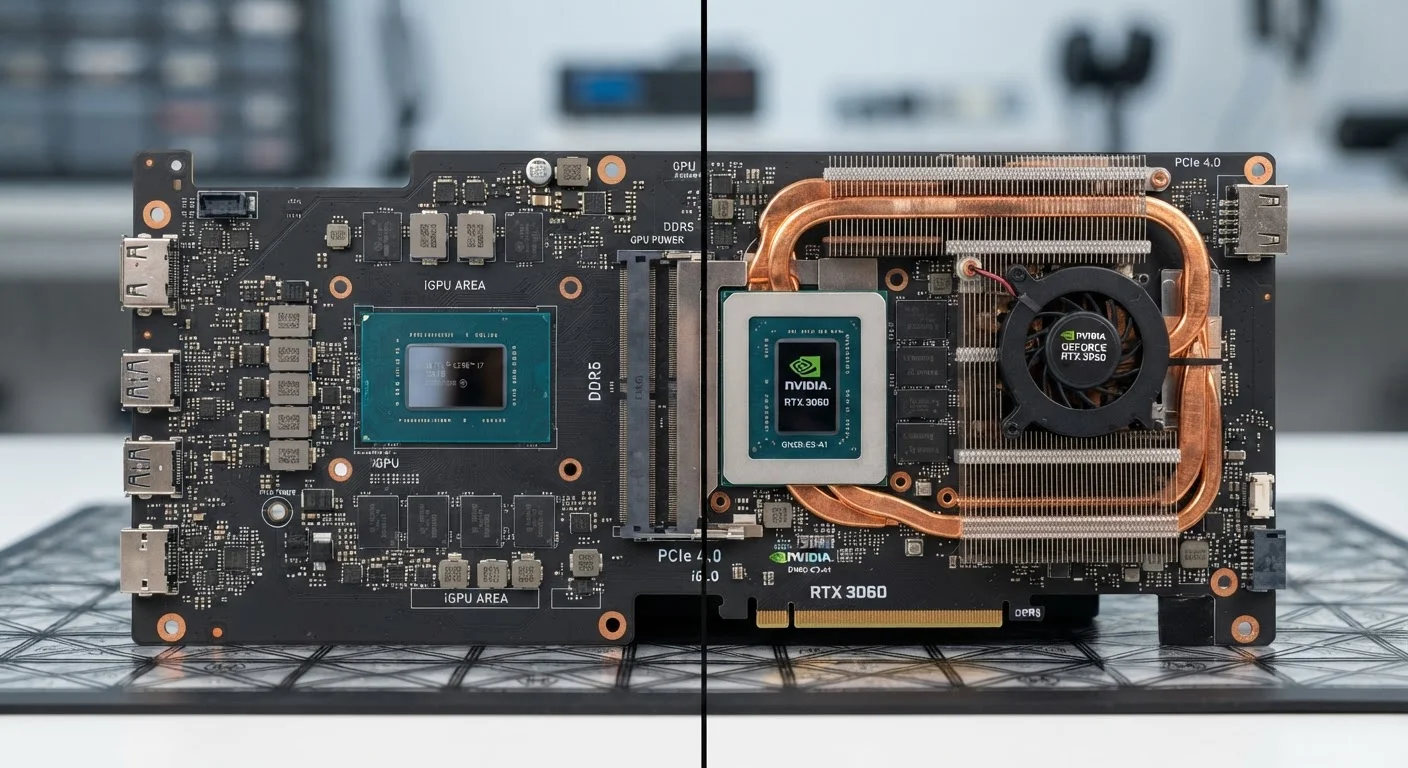
Photo credit: TopInfoTabs.com | Easy Insights For Inspiration
In this article
Not everyone needs a discrete graphics card. This comparison explains the real-world difference for everyday tasks, creative work, and gaming.
Key Takeaways
- Integrated graphics share system RAM and are built into the processor, making them sufficient for everyday computing tasks.
- Dedicated GPUs have their own video memory and processing power, making them necessary for gaming, 3D rendering, and video editing.
- Most users doing web browsing, document work, or streaming video will not notice a meaningful difference with integrated graphics.
- A dedicated GPU draws significantly more power and generates more heat, which affects battery life and laptop design.
- The gap between integrated and dedicated graphics performance has narrowed considerably with recent processor generations.
What Integrated and Dedicated Graphics Actually Mean
Every computer needs a way to render images on screen. The question is where that processing happens. Integrated graphics - sometimes called an iGPU - are built directly into the same chip as your processor (CPU). They share the computer's main memory (RAM) to do their work, which keeps costs low and power consumption minimal.
Dedicated graphics - also called a discrete GPU - are a separate component with their own dedicated video memory (VRAM) and processing cores. Because they don't compete with the CPU for system RAM, they can handle far more graphically intensive workloads without slowing the rest of the computer down.
Neither approach is universally superior. The right choice depends almost entirely on what you do with your device - and that's a question worth thinking through carefully before spending more than you need to.
How They Compare Across Real-World Tasks
The practical gap between integrated and dedicated graphics is enormous in some use cases and essentially invisible in others. Understanding where the boundary falls saves both money and frustration.
| Task | Integrated Graphics | Dedicated GPU | |
|---|---|---|---|
| Web browsing & email | Fully capable | No meaningful gain | |
| Streaming 4K video | Handles well on modern chips | No meaningful gain | |
| Office & productivity apps | Fully capable | No meaningful gain | |
| PC gaming (moderate settings) | Often insufficient | Significant advantage | |
| Video editing & export | Slow for heavy projects | Major time savings | |
| 3D modeling & rendering | Very limited | Essential | |
| Battery life (laptops) | Longer | Shorter under load | |
| Heat & fan noise | Lower | Higher under load |
For tasks like streaming video, video conferencing, or working in a spreadsheet, integrated graphics handle everything smoothly - modern integrated graphics from major chip makers can drive 4K displays and handle hardware-accelerated video decoding without any perceptible lag. The performance difference only becomes meaningful when sustained, parallel graphics workloads enter the picture.
When a Dedicated GPU Makes a Real Difference
Gaming is the clearest use case. Even moderately demanding titles can overwhelm integrated graphics, producing choppy frame rates or forcing visual quality settings so low the experience suffers. A dedicated GPU provides the headroom to run games at comfortable settings and smoother performance.
Video editing and 3D work benefit substantially from dedicated hardware. GPU-accelerated rendering in creative applications can reduce export times from hours to minutes. If your workflow involves professional-level video production, motion graphics, or 3D modeling, integrated graphics will become a bottleneck quickly.
Machine learning and data workflows increasingly rely on GPU compute. Researchers and developers working with frameworks that offload computation to the GPU will find integrated graphics insufficient for anything beyond basic experimentation.
Check Whether Your Software Uses GPU Acceleration
Before assuming you need a dedicated GPU for creative work, check the system requirements for the specific applications you plan to use. Some professional tools lean heavily on GPU acceleration; others are primarily CPU-bound. Matching your hardware to your actual software workload is more reliable than relying on general rules of thumb.
It is also worth noting that even within the dedicated GPU category, there is an enormous range - from entry-level options suited to light gaming to workstation-class cards built for professional rendering. More processing power always comes with trade-offs in cost, heat output, and power draw.
The Trade-Offs That Often Get Overlooked
Choosing a dedicated GPU is not purely an upgrade - it involves real trade-offs. Dedicated graphics hardware draws significantly more power, which translates directly to shorter battery life in laptops. It also generates more heat, requiring larger cooling systems and, in portable devices, louder fans under load.
This is directly relevant if you're weighing portability against performance. As we explore in our comparison of laptops and desktops, the form factor itself shapes what's realistic in terms of graphics capability - a slim ultrabook simply cannot accommodate the thermal demands of a high-powered discrete GPU.
Don't Conflate Spec Numbers With Real-World Need
Marketing materials frequently emphasize GPU specifications in ways that can make integrated graphics sound inadequate for tasks where they perform perfectly well. A higher-spec option that exceeds your actual requirements adds cost without adding usable benefit. Anchor your decision in the workloads you genuinely run, not worst-case benchmarks.
It's also worth recognizing that recent generations of integrated graphics have closed the gap considerably for lighter workloads. Treating integrated graphics as categorically inferior to what existed even three or four years ago can lead to unnecessary spending.
Making the Right Call for Your Situation
The most useful question to ask is not which option has better specifications, but what your actual day-to-day computing looks like. If your heaviest task is a video call or editing a long document, integrated graphics represent a sensible, efficient choice. If you plan to run graphically demanding applications regularly, a dedicated GPU is a practical necessity rather than an indulgence.
Consider also whether your needs might change. Someone who browses and streams today but is considering video editing as a hobby in the near future might reasonably factor that into the decision. Upgrading graphics capability in a laptop later is generally not feasible - it's a decision baked into the original purchase. For desktop setups, the calculus is somewhat different, since a discrete card can often be added or swapped out over time.
Ultimately, the integrated-versus-dedicated decision is most useful when it's grounded in genuine self-assessment rather than spec-sheet anxiety. More graphics power than you need costs real money and real battery life - and rarely improves the experience for the tasks you actually perform.

Author
Tech & Gadgets Editorial Team
Tech & Gadgets Editorial Team is the collective byline for our editorial team and contributor network. Articles published under this byline or an editorial pen name are researched, written, and reviewed according to our editorial standards for clarity, consistency, and independence before publication.
View all articles →