
Why Your Phone Battery Drains So Fast - and What's Actually Happening Inside
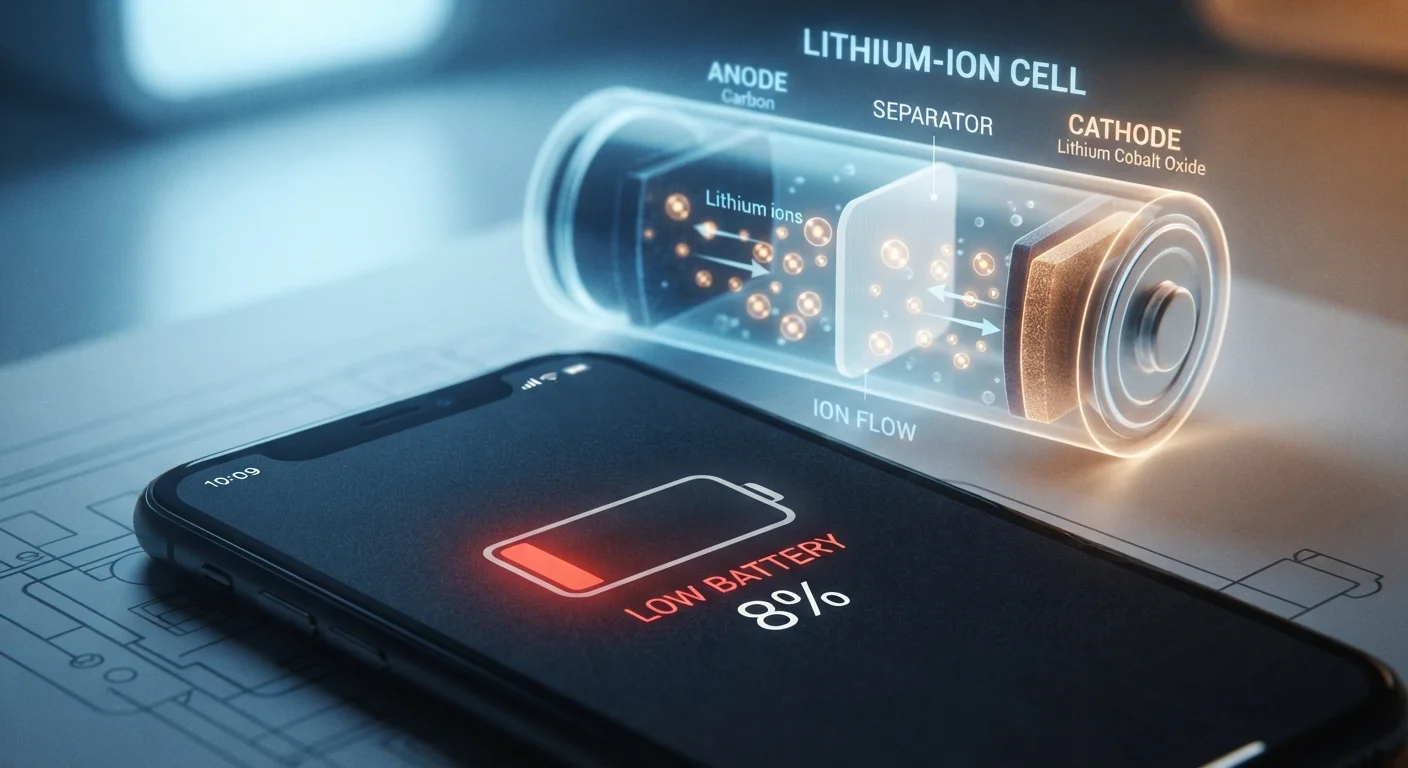
Photo credit: TopInfoTabs.com | Easy Insights For Inspiration
In this article
Background apps aren't always the culprit. Learn the real science behind lithium-ion battery drain and which habits quietly kill capacity over time.
Key Takeaways
- Screen brightness and 5G/cellular radios are typically the heaviest real-time battery consumers.
- Heat is lithium-ion's biggest enemy - sustained warmth accelerates permanent capacity loss.
- Charging habits matter: frequent partial charges are less damaging than deep discharge cycles.
- Battery capacity naturally degrades with charge cycles, regardless of how carefully you treat the phone.
- Background app refresh is often overstated as a drain culprit compared to display and connectivity.
The Real Science Behind What's Happening in Your Battery
Your phone's battery isn't storing electricity the way a jar stores water. Lithium-ion cells work by shuttling lithium ions between two electrodes - a graphite anode and a metal-oxide cathode - through a liquid electrolyte. When you discharge the battery, ions flow one direction to generate current. Charging reverses the flow. Every cycle leaves microscopic changes in the electrode structures, gradually reducing how many ions can move and how much energy the cell can hold.
This is why battery health declines are inevitable, not a flaw in your specific phone. The chemistry guarantees it. What varies is the rate of that decline - and that's where your habits have real influence.
Battery Health Is a Built-In Metric
Both major mobile platforms offer native battery health indicators in settings. These percentages reflect estimated remaining capacity relative to the original specification. A reading below 80% is generally when users notice a meaningful difference in daily range. Checking this periodically gives a concrete picture of your battery's condition without requiring third-party apps.
What Actually Drains Your Battery Day to Day
Most people suspect background apps first. In reality, the display is almost always the single largest consumer of real-time power. At full brightness, an OLED or LCD screen can draw as much energy as everything else combined. Right behind it: cellular and wireless radios.
- 5G connectivity - especially on sub-6GHz and mmWave bands - demands significantly more power than LTE to maintain signal.
- GPS and location services - continuous location polling keeps radios active and the processor busy.
- Push email and streaming - constant network activity keeps the modem alive rather than entering low-power sleep states.
- Processor-intensive tasks - video recording, gaming, and augmented reality apps spike CPU and GPU usage simultaneously.
Background apps, by contrast, are throttled heavily by modern operating systems. Unless an app is actively using location, audio, or notifications, its drain contribution is generally small. That said, a single misbehaving app - one that prevents the processor from reaching idle - can silently consume hours of battery life. Checking your platform's battery usage breakdown by app is a more reliable diagnostic than force-closing everything.
~500
Typical full charge cycles before noticeable capacity loss
Battery manufacturers commonly rate lithium-ion cells at 300-500 full cycles to 80% capacity retention, though real-world results vary by temperature and charging habits.
30-40%
Share of battery drain attributed to the display
Independent power-consumption analyses of smartphones consistently show the screen as the dominant single drain source during active use.
~20%
Extra capacity loss from sustained high temperatures
Studies on lithium-ion aging indicate that operating near 104°F (40°C) consistently can double or more the rate of electrolyte degradation compared to operation at room temperature.
How Heat Accelerates Permanent Capacity Loss
Temperature is the variable most users underestimate. Lithium-ion cells operate best between roughly 32°F and 95°F (0°C-35°C). Sustained heat - from direct sunlight, leaving a phone in a hot car, or running demanding apps while charging - accelerates a chemical process called electrolyte decomposition. The liquid that carries ions between electrodes breaks down, forming a resistive film on the electrodes over time.
The practical consequence: a phone that consistently runs warm will show measurable capacity loss faster than one kept in cooler conditions, even with identical usage patterns. This is also why charging a phone that's already warm compounds the damage - charging itself generates heat, adding to an already stressful thermal environment.
For comparison, similar principles apply to laptop batteries - the science of keeping a laptop battery healthy long-term shares the same electrochemical foundation.
Reduce Heat While Charging
If your phone feels warm during charging, remove any case to allow heat to dissipate. Avoid charging on soft surfaces like beds or couches that trap heat underneath. Charging at room temperature rather than in a hot environment meaningfully slows electrolyte degradation over the long run.
Charge Habits That Slow - or Speed Up - Degradation
The concept of a charge "cycle" matters here. One full cycle equals 100% of capacity discharged - whether that's one drain from 100% to 0%, or four drains from 100% to 75%. Research on lithium-ion behavior consistently shows that shallow partial charges are less stressful on cells than full discharge-to-zero cycles.
Keeping a phone between roughly 20% and 80% charge extends cell longevity compared to routinely running it flat and charging to 100%. Many phone manufacturers have added optional charge-limiting features (capping at 80-85%) precisely because the evidence supports this. What matters most for everyday users: avoid leaving the phone in the heat while charging, and avoid letting it sit at 0% for extended periods.
These same patterns extend to other device habits - common routines that gradually degrade phone performance often involve charging and thermal management without users realizing the cumulative impact.
Frequently Asked Questions

Author
Tech & Gadgets Editorial Team
Tech & Gadgets Editorial Team is the collective byline for our editorial team and contributor network. Articles published under this byline or an editorial pen name are researched, written, and reviewed according to our editorial standards for clarity, consistency, and independence before publication.
View all articles →